Signing up for Bitget takes a couple of minutes: tap Sign up, enter an email address or phone number, set a password and type in the six-digit code Bitget sends you. The identity check that follows can't be skipped: since September 2023 every new account has needed it before it can deposit, trade, withdraw or use P2P, and Bitget says most checks are done within a few minutes to an hour.
This guide has one referral link, the sign-up button in step 1, marked as such; you can just as well sign up on Bitget's own site or app.
How to sign up for Bitget
- Open Bitget's website or app and tap Sign up. The button below opens the same sign-up form as Bitget's own site. If you live in a country Bitget's terms exclude (listed near the end), stop here.
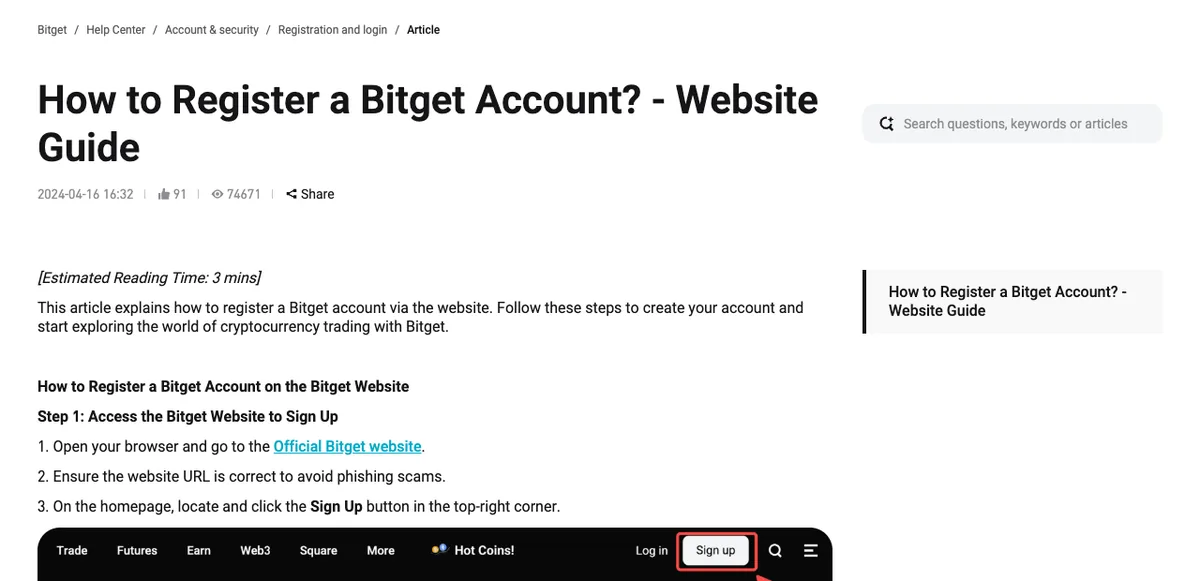
- Choose email or mobile number and enter it. The website also offers Google, Telegram and a crypto wallet; Bitget's Academy guide adds Apple.
- Leave the referral code field empty unless you have a code you want to use.
- Accept the User Agreement and Privacy Policy and set a password. The app asks for 8 to 32 characters with a number, an uppercase letter and a special character.
- Enter the six-digit code Bitget sends you. Bitget says an emailed code is valid for 10 minutes.
- Turn on two-factor authentication with an authenticator app before you put money in. You'll need the code later to release USDT when you sell.
Level 1 verification on Bitget
Level 1 is the check that opens the account for use: your ID plus a live face check through your camera. Have a government photo ID ready (national ID card, passport, driving licence or residence permit; you must be 18 or older) and your phone's camera: the face check asks you to blink and turn your head. Bitget asks for a proof of address from the last three months, in the same name as your ID, only in some cases, for example for higher limits. Each person can verify only one Bitget account. Bitget's help pages say a review usually takes a few minutes to an hour, rarely more than a few hours.
If it's rejected, the usual causes are a name typed differently from the ID, an expired document, a blurry or cropped photo, or poor light for the face check. Fix what the message names and submit again.
A Bitget P2P buy, start to finish
- In the app, go to Add funds, then P2P trading. On the website, it's under Buy crypto.
- Add a payment method in your own name if you haven't already. Bitget doesn't allow third-party accounts.
- On the Buy tab, choose USDT, your currency and your payment method.
- Compare the ads: price, order limits, payment methods and the advertiser's completion rate. A badge marks a verified merchant.
- Tap Buy, enter the amount and confirm.
- Pay the seller directly, for the exact amount, using the details on the order page. Don't mention crypto in the payment note.
- Tap Paid. The seller checks the payment and releases the USDT into your Funding account.
The payment time limit is set by each advertiser, at 15, 20, 30 or 60 minutes, and shown on the order. If you don't pay in time, the order cancels itself. Bitget's trading rules count that as a cancellation, and three cancellations in one day stop you from buying for the rest of the day. Bitget calls tapping Paid before you've paid malicious, and its guide warns never to cancel an order you've already paid unless the seller has refunded you.
The seller's USDT is held by Bitget from the moment the order opens, so a seller can't spend it while you're paying. For some currencies, Bitget's P2P User Agreement says USDT bought on P2P can be held for 24 to 48 hours before you can withdraw it.
Turning USDT back into cash on Bitget
- Add a payment method in your own verified name.
- On the Sell tab, choose USDT and your currency, pick a buyer and enter the amount.
- When the buyer marks the order paid, log in to your own bank or mobile money app and check the money is there. Receipts and screenshots can be faked.
- Check that the payer's name matches the buyer's verified name and that the amount is exactly right.
- Tap Release and enter your two-factor code.
Release is final. Bitget's agreement says it can't be reversed, so if the name is different, the amount is short or nothing has arrived, use the Appeal button instead. Never use one order's payment to release another, and keep every message in Bitget's chat.
Getting help when the coins don't arrive
You can appeal 10 minutes after the order is marked paid; a countdown on the order shows when.
- Open the order and try the chat first.
- Tap Submit appeal and choose the problem, such as paid but not released.
- Describe what happened (up to 500 characters) and upload your evidence.
Bitget treats video as the main evidence. Its appeal rules ask for a screen recording that shows you logging in to your bank or payment app, your account name and number, the payment's date and amount, the recipient's name and account, and today's date. Order and chat screenshots and bank records help too. A Bitget P2P specialist then joins the chat, and Bitget says most appeals are settled within 36 hours. It acts as a mediator: it can release the held USDT to you if the seller won't, but it doesn't promise a refund of money sent through a bank.
Reading the numbers on a Bitget ad
Bitget calculates an advertiser's completion rate over the last 30 days, and the lists we read show 30-day order counts and completion rates, the same basis as Binance. Some ads carry a Beginner-friendly tag, which only Bitget's higher merchant tiers can use, and advertisers can limit who may order, for example by number of completed trades or country of verification. Our rate pages leave out ads that only some visitors can take.
The cost of trading on Bitget P2P
Bitget says it charges no service fee for P2P trading. Your bank or mobile money provider may still charge for the transfer, and Bitget's agreement reserves the right to introduce fees later with notice.
Countries Bitget's terms exclude
Bitget's Terms of Use (last updated 4 November 2026) name these prohibited countries: Afghanistan, Austria, Belarus, Canada, the Central African Republic, Cuba, the Democratic Republic of the Congo, France, Germany, Guinea-Bissau, Haiti, Hong Kong, Iran, Iraq, Japan, Kazakhstan, Lebanon, Libya, Malaysia, North Korea, Russia, Singapore, Somalia, South Sudan, Sudan, Thailand, the United Arab Emirates, the United States and its territories, Yemen, and the Crimea, Donetsk, Luhansk, Kherson and Zaporizhzhia regions of Ukraine. Bitget can add others, and its terms forbid getting around the list with a VPN or proxy.
Bitget's own pages don't always agree with each other: the list on its identity verification page also names India, Italy and Spain. If you live somewhere on either list, check with Bitget before you deposit anything. The identity check asks for your country of residence, and an account that doesn't match it can be frozen later.
Bitget against Binance, OKX and Bybit on price
Our P2P price comparison shows what Bitget, Binance, OKX and Bybit offer for the amount you enter, from their latest public ads, best price first, with a link to each platform's own page for your country once there's enough data to show.
What this is based on: Bitget's help pages on registration (website and app, April 2024), its KYC guide (8 October 2026) and KYC page, buying and selling on P2P (December 2024), the P2P payment window (30 December 2024), the P2P trading rules, the P2P User Agreement (22 September 2025), its P2P fraud and appeal guides (3 August 2026), the Appeal Handling Rules (12 September 2025), its P2P fee pages (2 April and 21 July 2026) and the Terms of Use (4 November 2026), checked on 6 November 2026. Some of Bitget's older help pages carry its own warning that they may be out of date; where they disagreed with newer ones, this guide follows the newer page. Screen labels change, so if a button has moved, the order page's help link leads to the current flow.