If you've paid and the seller hasn't released your USDT, don't cancel the order. Open it and appeal: in the app tap Help on the order, then Appeal; on the website click Appeal on the Pending Release page. Choose the reason, say what happened and attach proof of your payment. The other side then has 10 minutes to respond, and if you can't settle it between you, Binance customer support reviews the case. Binance's own rules say a seller must release within 15 minutes of confirming the full payment has arrived.
When to appeal
- You're buying and you've paid and tapped Transferred, Notify Seller, but the USDT hasn't arrived within the release time shown on the order. Message the seller in the order chat first; Binance suggests appealing if there's still no reply after about 15 minutes.
- You're selling and the buyer has marked the order as paid, but nothing has arrived when you check your own banking or mobile money app. Don't release. Appeal from the payment confirmation page instead.
- The order is already cancelled or completed and something went wrong: you paid but it was cancelled, you released but weren't paid, the amount was short or over, the buyer reversed the payment, or your bank account was frozen because of the order. That has its own appeal, covered further down.
Never cancel an order you've already paid for. Cancelling sends the escrowed USDT back to the seller, and getting your money back then depends on the seller agreeing to refund it.
How to appeal a Binance P2P order in the app or on the website
In the app
- Open the order. If you're buying, tap Help on the page that's waiting for the seller to release; if you're selling, tap Help on the payment confirmation page.
- Choose Appeal. (Contact Counterpart opens the chat if you want to try that first.)
- Pick the reason, describe what happened in a few plain sentences and add screenshots of your payment.
- Submit. The order shows Appeal Submitted, and you can follow it under Progress.
On the website
- Go to Trade, P2P, then Orders, and open the order.
- Buying: click Appeal on the Pending Release page. Selling: click Appeal on the Verify Payment page.
- Fill in the reason and details and submit. The order shows how long until customer support steps in, and Appeal Status shows the progress. Binance also emails and texts you about each change.
If you tap Cancel Appeal by mistake, you have to wait 5 minutes before you can appeal again.
What proof to upload
- Screenshots of the payment from your own banking or mobile money app, showing the amount, date and time, the account you paid and any reference.
- A video proof of payment, if support asks for one. Binance's rules for it: record with a second phone, because screen recordings aren't accepted; open your bank app from the app store, log in (cover the password), then show your account name and number and the transaction itself. No cuts or edits, and no more than 200 MB (mp4, mov and similar formats).
- A bank statement, if asked: the PDF your bank produces, not a photo saved as a PDF, unedited and without a password, covering three months and showing your name and account number, under 200 MB.
How long a Binance P2P appeal takes, and what support decides
The other side has 10 minutes to reply. If you agree on a solution, cancel the appeal and finish the order normally. If they say negotiation failed, or don't reply, the case moves to customer support.
Support doesn't need both of you to cooperate. Binance says that if one side doesn't respond or send the information asked for by the deadline, the agent can decide directly, for example by force-releasing the USDT or force-cancelling the order.
Binance's P2P Appeal Handling Rules, which apply to trades in every currency except Chinese yuan, describe the usual outcomes:
- The buyer paid by an instant method and the seller doesn't respond: support releases the USDT to the buyer.
- The payment was a slower bank transfer: the seller has up to two working days to confirm. If they don't report that the money hasn't arrived, support treats it as received and releases.
- The buyer marked the order paid without paying: the order is cancelled. Three or more of these can get the buyer's account functions suspended.
- The order was cancelled after the buyer paid: support asks the seller to refund, but Binance says this is "on a best effort basis" and it isn't liable if the seller refuses. This is why you shouldn't cancel a paid order.
- The seller released before checking the money had arrived: the loss is the seller's, and Binance can't guarantee getting it back.
How long it takes isn't fixed. Binance's page on completed and cancelled orders asks you to allow 15 to 30 minutes for support to review and respond; older Binance posts mention 24 to 48 hours for a decision, and the USDT stays locked while the case is open. If you're unhappy with the outcome, Binance's complaint process acknowledges a complaint within 2 business days and aims to give a final answer within 30 business days, 60 at most.
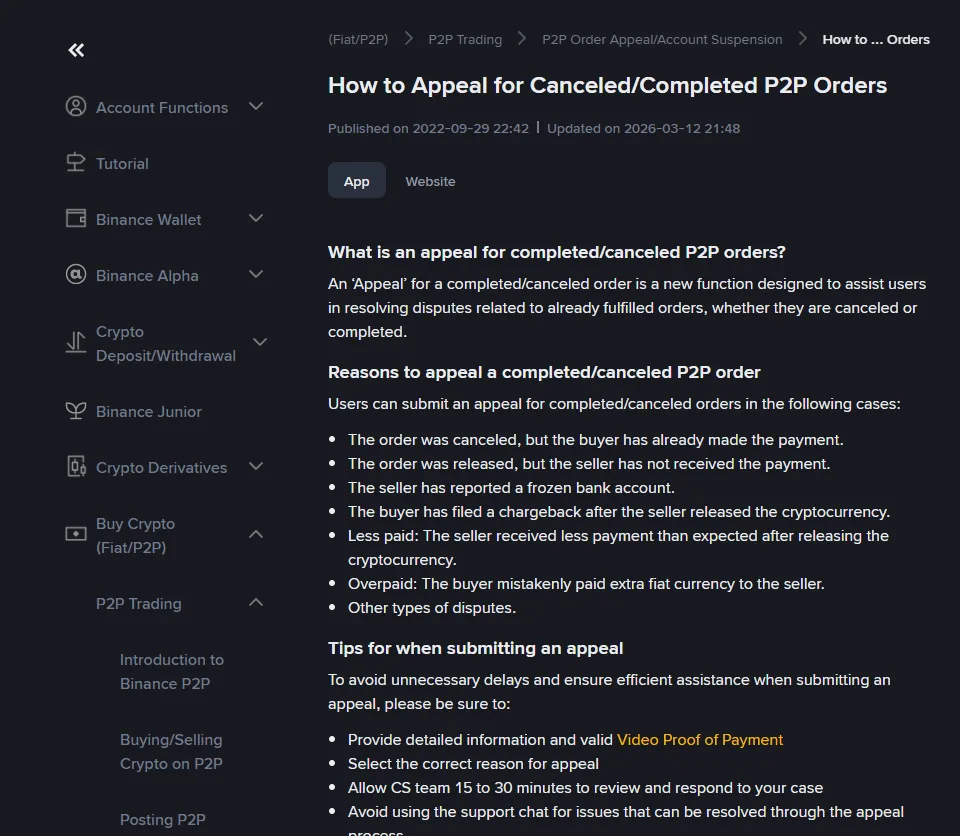
Appealing a completed or cancelled P2P order
- App: Trades, P2P, Orders, Fulfilled, then Canceled or Completed. Open the order, tap Need Help, choose the reason (for example I paid but the order is cancelled), then Appeal and File an Appeal.
- Website: All Orders, open the order, Need Help, choose the reason, then Appeal and Submit Appeal.
You can add information later from Appeal History in the app or Provide more details on the website.
Payment from a different name or a third party
If you're selling and the payment comes from an account whose name doesn't match the buyer's verified name, don't release the USDT. Binance's rules for this case:
- you refund the full amount to the account it came from;
- the order is cancelled once the buyer confirms the refund arrived;
- any fees are the buyer's to pay;
- the buyer's P2P access is suspended.
Open an appeal as well, so support has the case on record.
If the deal moved off Binance
Anything arranged on WhatsApp, Telegram or in person isn't protected. Binance's P2P policy says it isn't responsible for losses from trades set up through outside channels, and in "middleman" scams, where the talking happened somewhere else, support can do little. Report the user from the order chat (tap ..., then Report); this only works for people you've traded with, and anyone else can be reported through Binance Chat. Then go to the police (see the table below).
Bank account frozen after a Binance P2P trade
Freezes usually happen when money that passed through your account is reported as fraud somewhere along the chain. What helps:
- Ask your bank, in writing if you can, which authority asked for the freeze and how to contact it.
- Give that office your P2P records: order number, amounts and times, the counterparty's name, the order chat, and your bank statement.
- If the order is completed, appeal it with the reason The seller has reported a frozen bank account.
- If the police need Binance's records, they can request them through Binance's law enforcement channel. Binance says it complies once it receives an official request.
In India, the Ministry of Home Affairs says a grievance module for frozen bank accounts and lien marking has been running since April 2026. Ask your bank branch whether your case can be filed through it. People who contact you offering to "unfreeze" an account for a fee are running a scam; only the office that requested the freeze can lift it.
Where to report a P2P scam in your country
| Country | Where to report |
|---|---|
| Pakistan | National Cyber Crimes Investigation Agency (NCCIA), helpline 1799 |
| India | cybercrime.gov.in, or call 1930 |
| Kenya | Directorate of Criminal Investigations: FICHUA toll-free line 0800 722 203, or WhatsApp 0709 570 000 |
| Sri Lanka | Police Computer Crime Investigation Division: dir.cid@police.gov.lk, 011 2381058. Sri Lanka CERT takes cyber incident reports on hotline 101 |
| Tanzania | Report at a police station and keep the RB number. Report a scammer's phone number by texting UTAPELI to 15040 |
| Uganda | Your nearest police station, or the CID cybercrime unit at Kibuli. Emergencies: 999 or 112 |
| Oman | Royal Oman Police fraud hotline 80077444. A suspicious investment platform can also be reported through the Financial Services Authority's whistleblowing service on fsa.gov.om |
| Zambia | Your nearest police station, or the Zambia Police Service hotline 991 |
| The Gambia | Your nearest police station, or the Gambia Police Force on 9968885 |
Take the order number, your payment screenshots, the order chat and your bank or mobile money records with you.
Avoiding this next time
Most appeals start with the same few mistakes: picking a near-new seller for a better price, paying from someone else's account, tapping the paid button too early, or moving the chat off Binance. The buying guides for Pakistan, Kenya, Tanzania and Uganda, Sri Lanka, India, Oman, Zambia and The Gambia go through each step, and the live rate pages only count sellers with a solid record.
What this is based on: Binance's help pages on P2P appeals (app and website guides, updated 23 December 2025; completed and cancelled orders, 12 March 2026), the P2P Appeal Handling Rules (15 October 2024), the P2P User Transaction Policy (12 May 2026), Binance's pages on video proof and bank statements, and the reporting pages of each country's police or regulator, checked on 7 October 2026 (for Oman, Zambia and The Gambia, the Royal Oman Police and Financial Services Authority notices, the Zambia Police Service website and the Gambia Police Force's March 2026 statement, checked on 17 October 2026). Screen labels change from time to time; if a button has moved, the order page's Help link leads to the current appeal flow.