Creating a Binance account takes about fifteen minutes if your ID and phone are nearby. You sign up with an email address or phone number (or a Google, Apple or Telegram account), link a referral code during sign-up if you have one, then verify your identity. You can't deposit, trade or use P2P until verification is done. The referral code is the one step you can't come back to: once the account exists, a code can't be added or changed.
Most people get stuck in three places: whether Binance accepts sign-ups where they live, why the ID check is rejected, and which security settings to switch on before any money goes in.
How to sign up for Binance with email or phone number
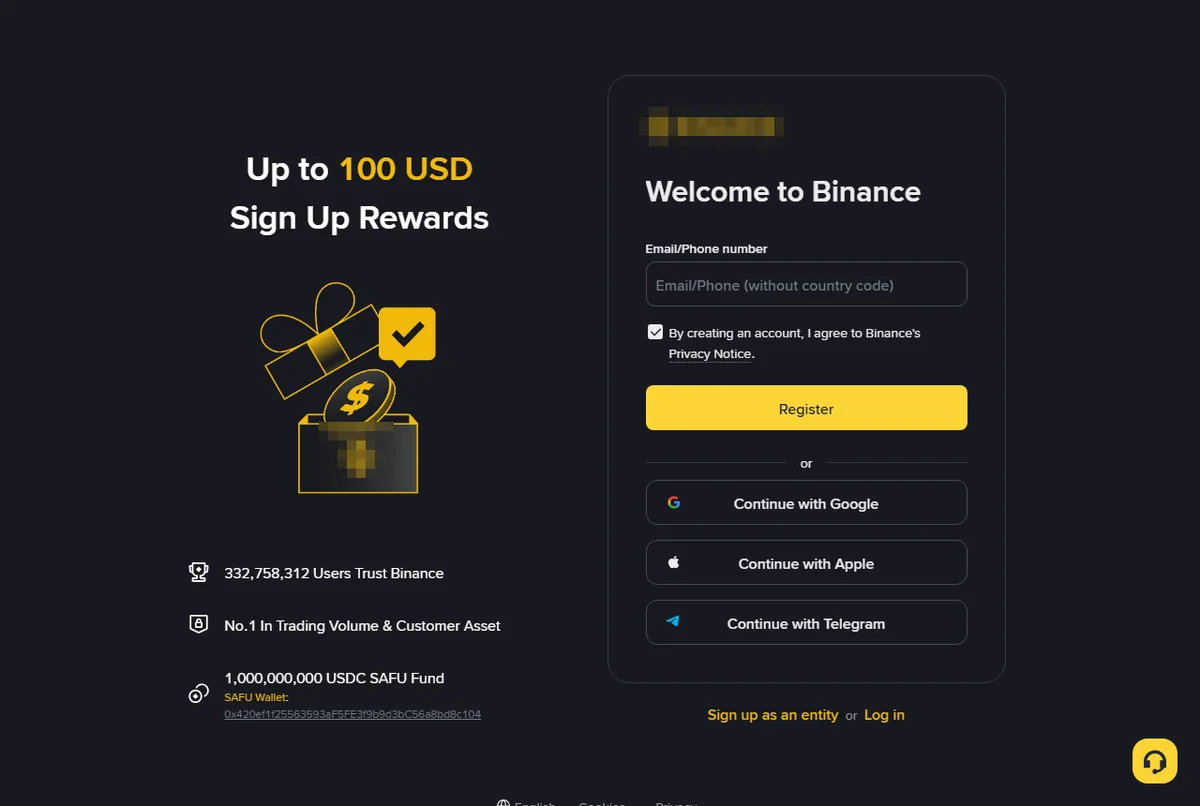
- Open the Binance sign-up page. Go through this Binance sign-up page with our referral code: the code ZY1818 is filled in for you, and accounts opened with it pay up to about a fifth less in trading fees. Signing up in the app instead? Copy the code
ZY1818first and paste it in step 4. This is a referral link; the sign-up page shows the current discount, which can change. Crypto trading carries risk and nothing here is investment advice. - Enter your email address or phone number, or choose Google, Apple or Telegram. Email is easier if you ever change numbers.
- Enter the six-digit code Binance sends you. It usually arrives within a minute.
- Check the referral code. Binance's help pages say a green tick and the word Linked appear next to a code once it's attached. If you came through the link in step 1, ZY1818 is already there: look for the tick and continue. If you typed the address, paste the code you copied. You can skip this step, but a skipped code can't be added later.
- Set a password you don't use anywhere else.
- Finish. You land in the app or web dashboard with a prompt to verify your identity.
Check you can sign up where you live
Binance.com does not accept residents of the United States, Canada or the Netherlands. Americans use Binance.US, a separate company with its own sign-up and its own export file. Binance stopped taking new customers in the UK in October 2023, and in mid-2026 told users in the European Union it could no longer accept new clients after failing to secure a MiCA licence. Australia is served by a local company, Binance Australia. The identity check asks for your country of residence and tells you if an account can't be opened there.
Don't work around this with a VPN or someone else's address. Verification compares your ID with the country you state, and an account opened on the wrong footing can be frozen later with your money in it.
What to have ready
- An email address you check, or a mobile number that receives texts. A local number is fine; email alone also works.
- A government photo ID: passport, national ID card or driving licence. The name you type must match it exactly.
- Your phone with a camera for the selfie check.
- An authenticator app (Google Authenticator, Microsoft Authenticator or similar) for two-factor codes.
- Sometimes a proof of address, such as a bank statement from the last three months. Not every country asks for it.
Can you add a Binance referral code after registration?
The code is attached when the account is created, and Binance's help pages say a linked code can't be modified afterwards. There's no field to add one later.
Binance does run a recall program for accounts that have never had a referrer: the account must be more than 90 days old and have had no trading or product use in the last 90 days, and it's linked through an invitation from a Binance affiliate. That's for long-dormant accounts, not a way to switch codes on one you use. If you're signing up today, link the code today.
Why Binance ID verification gets rejected, and how to fix it
You'll photograph your ID, take a short selfie video and confirm your personal details. Many people are approved within minutes; some wait a day or two.
What to do depends on what the screen tells you:
- "Document could not be read" or "image unclear." Retake it on a dark, plain surface in daylight, with all four corners visible and no glare across the photo. Don't upload a scan or a photo of a screen.
- "Name does not match." The name you typed must match the ID character for character, including middle names. Fix the typed name, not the document.
- The selfie check keeps failing. Remove glasses and hats, face a window rather than having it behind you, and follow the head movements slowly.
- "Document type not supported." Try a passport instead of a local ID card.
- Stuck on "under review" for more than two days. Open a support chat from inside the account and ask for the status. Re-submitting while a review is open can push you to the back of the queue.
If the same rejection comes back after two careful attempts, stop retrying and ask support what the reviewer saw.
Lock the account down before you deposit
- Switch two-factor authentication to an authenticator app. Text-message codes can be hijacked through SIM swaps; app codes can't.
- Set an anti-phishing code. It's a short code you choose (6 to 8 characters), and Binance includes it in every genuine email and SMS it sends you. A message without your code didn't come from Binance. On the website it's under Account, Security, Advanced Security.
- Turn on the withdrawal whitelist if you only withdraw to your own wallets. Withdrawals can then only go to addresses on your list, so someone who gets into the account can't send your coins to their own wallet.
- Never share codes. Nobody from Binance will ask for your password, your 2FA code or your screen over a call or chat.
Your first USDT
Once verification is through, you can buy USDT on P2P, paying another user in your own currency while Binance holds their USDT in escrow. The steps, the payment methods with sellers and the warning signs are in our guides for Pakistan, Kenya, Tanzania and Uganda, Sri Lanka, India, Oman, Zambia and The Gambia. Today's prices are on the USDT rates page.
Habits that make tax time easier
How your gains are taxed depends on where you file; we cover Australia, India, South Africa, New Zealand, Pakistan and Kenya. Whatever the rules, the gaps in your records almost always come from the first months of an account.
Note where every deposit came from. When you move coins in from another exchange or a wallet, write down the source and what you originally paid. Binance can't know your purchase price for coins bought elsewhere, and neither will your tax software unless the other platform's history is imported too.
Download your transaction history each year. Binance limits how many statements you can generate in a month, and each download link expires after seven days, so pull each year's file early in the next year and keep it. The steps are in how to export Binance transaction history.
Expect trades against USDT to need a price. The export shows how much USDT you spent, not its value in your currency. Our cost basis calculator marks those trades rather than guessing, so you can see which ones need a value.
Binance sign-up not working? Common fixes
- The email code never arrives. Check spam and promotions folders, wait two minutes, then request a new one. Some company email systems block these messages; a personal address usually works.
- "This account already exists." You, or someone using your email, signed up before. Use "Forgot password" instead of registering again.
- The slider puzzle fails repeatedly. Turn off ad blockers and similar browser extensions, or sign up in the mobile app instead.
- A notice about your region appears. That's the eligibility check from the first section. Switching browsers won't change it.
Referral code and Binance.US questions
Is the referral code required? No. The account works the same without one; you just pay standard trading fees.
Does the code cost me anything? No. It lowers your trading fees; it doesn't add any charge.
Can I use this guide for Binance.US? The security section applies, but sign-up, verification and the export file are different. Binance.US and Binance.com are separate platforms.
What this guide is based on: Binance's sign-up page and help center articles on registration, referral codes, the anti-phishing code and the withdrawal whitelist, checked on 6 October 2026. If Binance has changed these screens since then, button names may differ slightly; follow the screen in front of you.