Bybit's sign-up form asks where you live first. Click Sign up, choose your country, then enter an email address or phone number (or use Google, Apple or Telegram), the code Bybit sends you and a password. The step that decides when you can actually trade comes next: Bybit needs at least Standard identity verification for every product, P2P included, and says most reviews take about 15 minutes, up to 48 hours.
This guide has one referral link, the sign-up button in step 1, marked as such.
How to sign up for Bybit
- Click Sign up on Bybit's website or in the app. The button below opens the same form as Bybit's own site, with our referral code filled in.
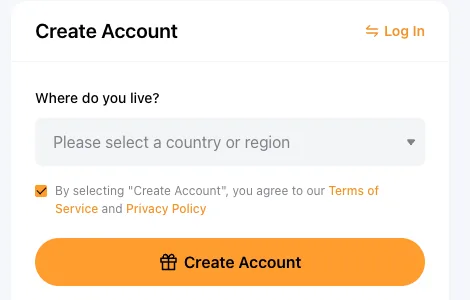
- Choose your country of residence. If Bybit doesn't serve it, you'll see a notice; if a regional company does, you may be redirected. The full list is near the end of this guide.
- Enter your email or phone number, or tap Google, Apple or Telegram. Bybit recommends email, because withdrawals need an email code and Google Authenticator. Apple's Hide My Email option gives Bybit a relay address instead of your real one.
- Leave the referral code empty unless you have one you want to use. It can't be added or changed later.
- Complete the captcha and the code Bybit sends by email or SMS.
- Set a password. You land on the dashboard with a prompt to verify your identity. Turn on Google Authenticator before you deposit anything.
Each email address or phone number can open one account, and each person can verify only one.
Bybit's identity levels
Bybit has three levels:
- Standard: a photo of your ID and a face scan. This is the one P2P needs.
- Advanced: proof of address, for higher limits. You can only do it after Standard.
- Pro: a questionnaire and proof of income, for the highest limits.
For Standard, have a physical government photo ID from your country (passport, national ID card, residence permit or driving licence) and a laptop camera or your phone for the face scan. Bybit doesn't accept scans, e-copies, visas or domestic passports. For Advanced, the proof of address must be from the last three months: a utility bill or bank statement, not a phone bill or insurance letter.
The common reasons for a rejection are a scan instead of a photo of the real card, a document missing your date of birth or issue date, an expired ID, or a face scan in poor light. Fix what the message names and submit again.
Buying USDT from a Bybit P2P advertiser
To take an ad, Bybit asks for Standard verification and a linked email and phone number. Its P2P introduction also mentions a 200 USDT security deposit, but Bybit's deposit FAQ says that applies only to accounts its risk checks flag and to people applying to advertise.
- Go to Buy crypto, then P2P trading. Filter by USDT, your currency, the amount and your payment method.
- Check the ad: the price, the available amount, the minimum and maximum per order, the payment methods, and the advertiser's orders and completion rate over the last 30 days.
- Click Buy USDT, enter the amount in USDT or your currency, and confirm. Bybit may ask for a security code.
- Pay the seller within the countdown shown on the order, from an account in your own name. Don't write USDT, BTC or crypto in the payment reference.
- Click Payment completed, uploading the receipt if the order asks for it.
- Wait for the release. The USDT lands in your Funding account.
Some ads from verified advertisers ask for more before you pay: a face check, a photo ID, a bank statement or a short questionnaire. The countdown length isn't fixed; if you haven't paid and clicked the button before it runs out, the order cancels itself. A buyer can cancel up to three orders in 24 hours; past that, P2P is blocked for a day. Never cancel an order you've paid unless the seller has refunded you.
The seller's USDT is locked on the platform while the order is open, so it can't go anywhere else while you pay. If the seller hasn't released 10 minutes after you marked the order paid, you can appeal, and Bybit's support can release the USDT to you once it has checked your payment. Bybit doesn't hold the money you send: that goes straight from your account to the seller's. Bybit can hold USDT bought on P2P for up to 24 hours before you can withdraw it if its checks flag the trade.
Selling USDT for local currency on Bybit
- Go to P2P trading, then the Sell tab, filter the ads and click Sell USDT.
- Enter the amount and confirm with your security code. The USDT comes from your Funding account (or a flexible Earn product), not your Unified Trading Account.
- When the buyer marks the order paid, open your own bank or mobile money app and check the money is there. Don't trust a screenshot or a text message.
- Check the payer's name matches the buyer's verified name and the amount is exact.
- Click Release now and confirm.
If nothing has arrived, choose I have not received the payment; after 10 minutes you can open a dispute. Never accept a payment from a third party, never agree to a "mutual agreement" cancellation under pressure, and keep every message in Bybit's order chat. Bybit says it never asks you by email to release funds.
Bybit appeals when a seller goes quiet
Try the order chat first. Then open P2P orders, select the order, tap Order dispute?, choose the reason and Get help. You can appeal while the order is in progress, or within 5 days after it was cancelled or completed; after that, use Bybit's support form.
Bybit has two tracks:
- Fast track, only for "paid but not released" and "not paid" on an order still in progress. Bybit gives a judgment within 15 minutes and freezes the assets for a period in which the other side can object.
- Normal track: you and the other side talk first, then either of you can ask for the platform to step in, and a P2P specialist joins the chat to decide.
Bybit's appeal page asks buyers for a screen recording that shows you logging in to your banking app, the account page with your name and number, and the payment in your history with the amount, the recipient's name, the date and the time. A seller's video should start by searching today's date and time in a browser. Large videos can be shared through a Google Drive or WeTransfer link. Bybit doesn't promise to recover money, and trades agreed outside Bybit aren't covered.
Countries Bybit doesn't serve
Bybit's list of restricted countries (updated 16 October 2026) covers the United States, mainland China, Hong Kong, Singapore, Canada, North Korea, Cuba, Iran, Uzbekistan, Sudan, Syria, Crimea and the parts of Donetsk, Luhansk, Kherson and Zaporizhzhia outside Ukrainian government control, as well as anyone on US, EU or UK sanctions lists. The platform terms of its main company add Australia and France. Some countries are served by a regional Bybit company instead, and the sign-up page may send you to it: Bybit's UAE company, for example, has its own terms and doesn't serve Dubai.
Bybit's KYC FAQ says its country restrictions go by nationality, not only where you live. Choose your real country when you sign up; Bybit's P2P terms say P2P isn't available to users from mainland China.
Fees on Bybit
Bybit charges P2P fees only in some currencies. Its fee page (updated 28 July 2026) has tables for the Nigerian naira, Azerbaijani manat, Russian rouble, Ghanaian cedi and Tajik somoni, and says currencies not listed carry no transaction fee. In the listed currencies, fees fall mostly on advertisers, between 0.25% and 0.3%; in manat, takers pay 0.25% too. Your bank or mobile money provider may charge for the transfer.
Is Bybit cheaper than Binance, OKX or Bitget?
Our P2P price comparison shows what Bybit, Binance, OKX and Bitget offer for the amount you enter, from their latest public ads, best price first, with a link to each platform's own page for your country once there's enough data to show.
What this is based on: Bybit's help pages on registration (updated 17 August 2026), individual KYC and its FAQ (6 July and 20 August 2026), the introduction to P2P trading (27 October 2026), the P2P FAQ (27 September 2026), buying and selling on P2P (2 September 2026), submitting a P2P appeal (30 April 2026), cancellations and completion rate, avoiding P2P scams, P2P fees (28 July 2026) and restricted countries (16 October 2026), with Bybit's Peer-to-Peer Terms (19 January 2026) and platform terms (16 October 2026), checked on 6 November 2026. Bybit's pages don't always agree on which countries are restricted, and the terms shown can depend on your region; the sign-up page tells you whether your country is served.