To open an OKX account, tap Sign up, choose the country you live in, enter your email address and the code OKX sends to it, then add your mobile number and set a password. The ID check comes straight after, and it is the step that decides when you can trade: until it's done, OKX doesn't let the account buy, sell, deposit or withdraw, and P2P stays closed. Most checks come back about 30 seconds after the upload. Once you're verified, OKX P2P charges no fee on either side of a trade.
This guide has one referral link, the sign-up button in step 1, marked as such; you can just as well sign up on OKX's own site or app.
How to sign up for OKX
The steps are the same in the app and on the website:
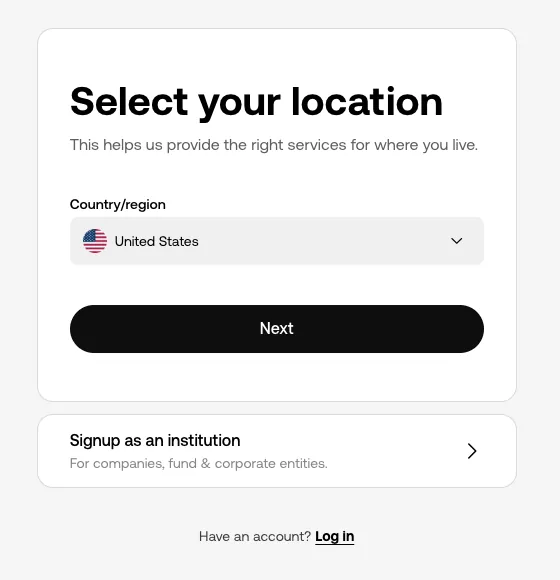
- Tap Sign up and choose your country or region of residence. The button below opens the same sign-up form as OKX's own site. OKX fills in the country you seem to be connecting from, so check it; the places OKX doesn't serve are listed further down.
- Agree to the terms: the Terms of Service, the Risk and Compliance Disclosure and the Privacy Notice.
- Enter your email address. The referral code field next to it is optional; leave it empty if you don't have one.
- Enter the code OKX emails you.
- Add your phone number with the right country code and enter the SMS code.
- Set a password you don't use anywhere else if the app asks for one, then turn on two-factor authentication with an authenticator app before you put any money in.
Each email address and each phone number can be used for one OKX account only. OKX's US beginner's page also mentions signing up with Google, Apple or Telegram. Its main registration guide describes only email and phone, so expect to give both either way.
Identity check: what OKX asks for
Start the check from your profile: Verification, then Individual account on the website, or Account settings, then Identity verification in the app. You fill in your country of residence, nationality, full name, date of birth, ID number and address, upload your ID, and take a selfie inside the oval on screen.
What the check asks for:
- A valid government photo ID: passport, national ID card or driving licence. It must not be expired, and OKX wants all four corners in the photo, not a screenshot.
- Your phone's camera for the selfie. Take off glasses, hats and masks.
- Sometimes a proof of address dated within the last three months, such as a bank statement or utility bill.
OKX says most checks finish about 30 seconds after the upload, and that a manual review can take up to 24 hours, longer at busy times. One ID can be linked to one OKX account only. You must be 18 or older.
The usual reasons a check fails are the ones you'd expect: a name typed differently from the ID, an expired document, a blurred or cropped photo, or glare on the selfie. Fix the one the rejection message names and try again.
Placing a buy order in OKX's P2P market
OKX has two ways in. Express picks a merchant for you; P2P trading lets you choose the ad yourself, which is the one to use if you care about the merchant's record.
- Open Buy crypto, then P2P trading, then Buy. Choose USDT and your currency, and filter by payment method.
- Check the ad: the price, the order limits, the payment methods and the merchant's completion rate. A badge next to the name marks a verified merchant.
- Tap Buy, enter an amount inside the ad's limits and choose how you'll pay.
- Pay the merchant using the details on the order page, from an account in your own name, for the exact amount. Don't write USDT, crypto, OKX or the order number in the transfer note.
- Tap I have paid and upload proof of payment.
- Wait for the merchant to release. OKX holds the merchant's USDT in escrow from the moment you order; its rules give a merchant outside China 15 minutes to release once the payment is in.
The payment window is set by the merchant and shown on the order. OKX's help pages say it's usually 30 minutes, and the order cancels itself if you haven't paid and tapped the button by then. Don't start a transfer when the timer is nearly out: if it reaches zero before you've marked the order paid, the USDT goes back to the merchant.
Three more rules worth knowing before your first order:
- Never cancel an order you've already paid. Only the buyer can cancel, and cancelling more than three orders in a day blocks you from new orders for the rest of the day.
- Paying from someone else's account suspends your P2P access for at least 15 days.
- USDT bought on P2P can be held for 3, 7 or 15 days before you can withdraw or sell it, if OKX's security checks flag the purchase.
Cashing out USDT to your bank on OKX
Before you can sell, OKX needs your verification done, your email and phone linked, and at least one payment method in your own name.
- Open P2P trading, then Sell, and choose the currency you want to receive.
- Pick an ad, enter the amount and confirm with your two-factor code.
- Wait for the buyer to pay.
- Check the money in your own bank or mobile money app, not in a text message, an email or a screenshot the buyer sends. Make sure the payer's name matches the buyer's verified name on the order.
- Tap Release crypto and confirm again.
OKX's P2P User Agreement treats Release crypto as your confirmation that the full payment arrived, and the release can't be undone. If the name doesn't match or the amount is short, don't release: raise a dispute. Some payment methods take one to three business days to arrive.
If the merchant doesn't release: raising a dispute
Try the order chat first and keep everything in it; OKX uses the chat as evidence. If that doesn't work:
- Open Orders, then the order, then Need help?
- Choose your problem, and if the suggested fixes don't solve it, tap Raise dispute.
- Describe what happened and upload your proof: a screen recording or screenshots of the payment in your bank app, showing the amount, the date and the recipient.
The in-app dispute flow covers orders up to 72 hours after they were created; after that, contact OKX's online support. OKX says to allow up to 24 hours for a reply, and you can add evidence or ask for an update from the order's dispute page.
What OKX can and can't do is worth knowing up front. While the merchant's USDT hasn't been released, OKX can hold it. Money you've already sent through a bank is outside OKX: it can't reverse a transfer or make your bank refund it.
What the merchant figures on OKX ads mean
OKX works out completion rate as completed orders divided by completed plus cancelled orders. Two versions exist: the 30-day rate, updated once a day, and the all-time rate. The lists we read for our rate pages give the all-time figures, so the order counts there are since the account opened, not over the last 30 days. A high count with a 99% completion rate means more than a new account with a perfect record over a handful of orders.
Where OKX doesn't operate
OKX judges eligibility by your country of residence, not your nationality. Its global Risk and Compliance Disclosure (last updated 8 July 2026) lists these restricted locations: Afghanistan, Canada, Cuba, Hong Kong, India, Iran, Japan, Malaysia, Nepal, North Korea, Syria, Uzbekistan, the Crimea, Donetsk and Luhansk regions of Ukraine, and parts of the United States including all US territories. P2P specifically is not offered to residents of Brazil, Eritrea, South Korea or the United Kingdom.
OKX US is a separate company with its own list, and it offers no P2P trading. Choose your real country of residence when you sign up. OKX's verification FAQ says not to pick another country to unlock a service, and an account opened on the wrong footing can be restricted later with money in it.
OKX also limits P2P to the currency of the country you registered in: a verified user in Kenya trades in shillings, not in rupees.
What OKX charges
OKX charges no trading fee on P2P buying or selling, for users or merchants. Your bank or mobile money provider may still charge for the transfer. P2P trades don't count toward your OKX fee tier.
OKX prices next to Binance, Bybit and Bitget
P2P prices on different platforms often differ by a few tenths of a percent, sometimes more on a large order. Our P2P price comparison shows what OKX, Binance, Bybit and Bitget offer for the amount you enter, from their latest public ads, with a link to each platform's own page for your country once there's enough data to show.
What this is based on: OKX's help pages on account registration (updated 11 August 2026), individual verification and review times (25 August 2026), the verification eligibility FAQ (5 November 2026), buying, selling, cancelling and disputing P2P orders and checking completion rates (15 September and 26 August 2026), the P2P User Transaction Rules, the P2P User Agreement, the trading fee FAQ, the global Risk and Compliance Disclosure (8 July 2026) and the Terms of Service (29 October 2026), checked on 6 November 2026. OKX shows some pages differently by region, and screen labels change; if a button has moved, the order page's Need help? link leads to the current flow.